
5 Science-Backed Ways to Go Beyond Narrated PowerPoint eLearning

Here's the original article I wrote for Evolve Solutions Group: https://evolve-sg.com/5-science-backed-ways-to-go-beyond-narrated-powerpoint-elearning/
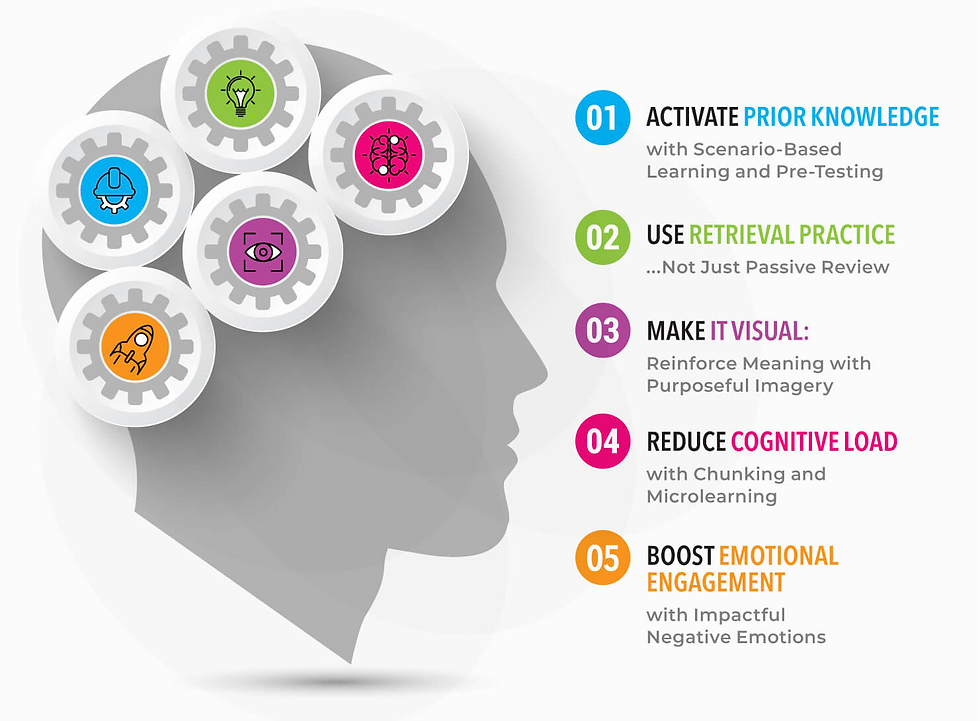
Narrated PowerPoint-style eLearning still makes up the majority of online training, but it’s not doing learners any favors. Linear slides with stock images, bullet points, and voiceover rarely activate areas of the brain responsible for deep, lasting learning. Research from cognitive science, neuroscience, educational psychology, and multimedia learning offers clear guidance on how to create eLearning that actually works.
Below are five evidence-based strategies that your training development team can use to move beyond passive presentation and into active engagement.

1. Activate Prior Knowledge with Scenario-Based Learning and Pre-Testing
Before new content can stick, the brain needs context. Activating prior knowledge – what learners already know (or think they know) – helps them make sense of new material by attaching it to existing mental frameworks, or schemas. Realistic scenarios and pre-tests serve as powerful primers: studies show that even incorrect answers on pre-tests can enhance retention and attention by priming the brain to absorb and connect new information more effectively.
Application Tip:
Set the expectation early in your project that every course or module should begin with a real-world scenario or challenge the learner might actually face – not a definition or list of objectives. Follow it with a short quiz or reflection prompt, even before the core content is introduced. The act of attempting to answer, even incorrectly, primes the brain for learning and significantly improves retention by activating critical thinking centers of the brain. Standardizing this approach in your development process ensures your team consistently taps into how people actually learn.
Evidence:
How People Learn, Bransford et al. (2000): Students learned more when lessons began by activating their prior knowledge—even if it was incorrect. Learn more here.
Little & Bjork (2016): Pre-testing improves learning even when answers are incorrect. Learn more here.
Richland & Simms (2015): Schema activation supports analogical reasoning. Learn more here.

2. Use Retrieval Practice, Not Just Passive Review
One of the most robust findings in learning science: retrieving information strengthens memory more than re-studying it. When learners are prompted to recall what they’ve learned through questions, short prompts, or decision-making, they form stronger, more durable memories.
Application Tips:
Build your learning strategy to reinforce key concepts more than once – don’t rely on a single touchpoint to make it stick. Work with your team to design learning journeys that intentionally revisit core ideas through varied formats: scenarios, reflection questions, or cross-module challenges. Spacing these retrieval opportunities across a course or curriculum strengthens memory and improves long-term application on the job. Make this layered reinforcement a standard in your training design process.
Evidence:
Roediger & Butler (2011): Retrieval practice improves long-term retention. Learn more here.
Karpicke & Blunt (2011): Retrieval outperforms elaborative studying. Learn more here.

3. Make It Visual: Reinforce Meaning with Purposeful Imagery
The human brain is wired for visuals – over half of the cortex is involved in visual processing. When words and visuals work together to convey the same idea, learners are more likely to understand and remember the message. But decorative or mismatched images can create confusion and increase cognitive load.
Application Tip:
Make it a standard in your development process that every visual element must serve a clear instructional purpose. Diagrams, process flows, and animations should clarify complex ideas, not just decorate the screen. Stock imagery can be used sparingly to set tone or evoke emotion, but it shouldn’t be relied on to fill space. Set clear guidelines during planning to ensure visuals consistently support learning goals, not distract from them.
Evidence:
Mayer, R.E. (2021). Multimedia Learning: Principles That Work. In The Cambridge Handbook of Multimedia Learning (2nd ed.). Learn more here.
Clark, R. C., & Mayer, R. E. (2016). E-Learning and the Science of Instruction. – Offers practical design rules backed by dual channel theory. Learn more here.
Schroeder & Cenkci (2018): Purposeful visuals improve learning outcomes and engagement in eLearning environments. Learn more here.

4. Reduce Cognitive Load with Chunking and Microlearning
Learners can only process a limited amount of information at once. Just like physical exercise, working your brain for 20 minutes per day is more effective than 140 minutes once per week. Overwhelming slides overloaded with text, too much information at once, or long modules cause overload and reduce retention. Microlearning and chunking manage this load more effectively.
Application Tip:
In early planning, focus on breaking complex processes into clear, actionable steps. Build courses around real tasks and performance goals, not just topics. Collaborate with both stakeholders and representatives from the learner audience to surface performance gaps and practical insight. The people who need the training often hold valuable, real-world insight that those requesting the training, might overlook or simply not have access to. Use tools like Action Mapping to keep content focused on behavior change and prevent overload. Breaking content into meaningful, goal-based steps ensures relevance and keeps cognitive load manageable.
Evidence:
Sweller, Ayres & Kalyuga (2011): Cognitive Load Theory shows learners benefit when instruction is structured to reduce overload. Learn more here. Yousuf, M. I., & Sumaya, M. M. (2024): Microlearning significantly reduced extraneous cognitive load and increased engagement and retention. Learn more here.

5. Boost Emotional Engagement with Impactful Negative Emotions
Corporations often shy away from using negative emotions in training, worried about being politically correct or overly harsh; but this reluctance misses one of the most powerful drivers of learning. Negative emotional contexts, when used thoughtfully, grabs attention, deepens memory, and motivates behavior change.
Application Tip:
The working world isn’t all peaches and cream – so get real. Even though research shows that emotions like regret and urgency can deepen learning, many teams avoid using them – afraid of pushback or crossing some unwritten line. But discomfort, used intentionally, drives reflection and behavior change. Designers and developers can’t build this in without support, so work with business partners and stakeholders to surface real-world missteps and consequences. Then collaborate with your team to bring them to life in vivid case studies or simulations that mirror the complexity of real decisions. Too-easy, obvious questions encourage passive clicks. Real scenarios with gray areas push learners to think critically and engage more deeply.
Evidence:
Vaish et al. (2008): Evidence that humans give greater attention to, and learn more from, negative information compared to positive – across cognitive and memory tasks. Learn more here.
Baumeister et al. (2001): A foundational review of the negativity bias shows that negative events and emotions are processed more thoroughly than positive ones—leading to better memory and decision-making. Learn more here.
Design with Proven Neuroscientific Strategy
By now, we all know that dumping information into narrated PowerPoint slides doesn’t cut it. But adding gamification or slick visuals on top of shaky content won’t fix the problem either. Engagement isn’t about flashy features—it’s about being intentional, thoughtful, and grounded in how people actually learn.
When you anchor your learning experiences in science-backed strategies, instead of defaulting to what’s familiar or easy, you create something that actually sticks. So, let’s stop checking boxes and start building training people remember.


